01
Use the calculator, then open a vault
Do a calculation, enter the public sample PIN and see how the disguise leads into the encrypted library. Try the regular lock route too.
Try the calculator
Vault Max by Mad Max Labs
iPhone · iPad · iPhone Duo
Vault Max keeps photos, videos, notes and files encrypted on your device. Organize a personal collection, give different vaults their own codes and choose how the app opens and locks.
Made and published by Mad Max Labs. No app account, no developer-operated cloud storage, no advertising and no analytics. Available on the App Store for iOS 26 or later.
Free to start. Every security feature is included in the free plan. Optional subscriptions and Lifetime Unlock remove item limits and allow more vaults.
Real screens. A closer look at what each app does.
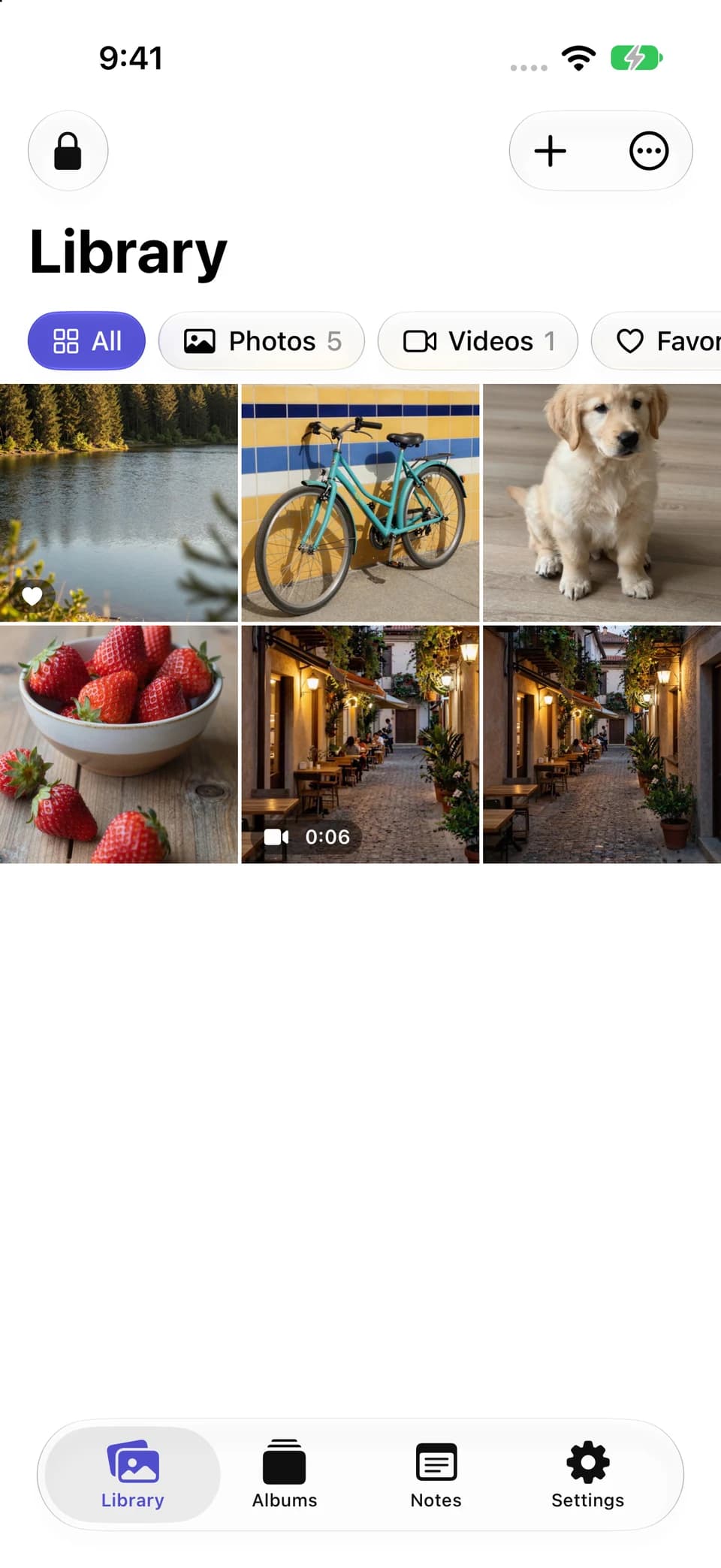
Photos and videos share one encrypted library. Filter by media type, open a favorite or collect related items in an album. This is the actual iPhone app with sample content.
From setup to something useful
Choose your vault credential, then import a few pictures or files. The first useful result is an item you can open inside Vault Max, with a deliberate plan for the original and for your backup.
Vault Max with sample content. Use the controls to pause or replay.
Media filters narrow a mixed library. Favorites keep important items close, and albums group related content without making a second copy into another vault.
Store photos, videos and supported files alongside encrypted notes. Live Photos retain their motion, and the viewer keeps the collection inside the vault while you browse.
Use the Files picker for existing documents or deposit supported attachments from another app's share sheet. The extension can receive a deposit while the main vault stays locked.
Private Camera captures directly into the app when camera permission and hardware are available. Video capture also needs microphone permission for sound. Permission requests belong to the features that use them.
Try a workflow
These guided explorations pair real Vault Max screens with actions you can try in the browser. Use the public sample credentials provided in each guide. Your own vault credentials and private content belong in the app.
01
Do a calculation, enter the public sample PIN and see how the disguise leads into the encrypted library. Try the regular lock route too.
Try the calculator02
Open the main and decoy sample libraries. Compare their contents, then follow the real creation, confirmation and management screens.
Explore separate vaults03
Try the illustrated shake and face-down gestures, compare Panic lock on and off, and see the real app's lock screen.
Try the quick exit04
Move between the compact, open and partially folded layouts. See how the actual library, photo viewer and controls use the available space.
Explore Duo layoutsCalculator mode performs ordinary arithmetic. Enter the vault PIN and press equals to open that collection; press and hold equals for the regular lock screen. Choose alternative icons in Settings. iOS can still identify the app in system surfaces.
A decoy uses the same Library interface with its own collection. The locked app does not present a public vault list; the owner manages child vaults from Settings. The free plan includes 1 extra vault, and paid plans support up to eight total vaults per device.
Ordinary decoys keep collections separate. A duress vault has an optional, destructive erase action that can remove every other vault when its credential opens it. That option requires a deliberate setup decision; the interactive guides demonstrate ordinary decoys.
A layout for the space you have
On iPhone Duo's outer display, Vault Max keeps a compact media grid and side-strip controls. Open the device and the same library gains more columns. In the partially open viewer, the photograph and its filmstrip and actions receive separate space.
Share, Info, Move and other viewer actions stay close to the selected picture. The optional Lock when folded shut setting connects closing the device with ending the unlocked session.
Compare and explore the Duo layouts →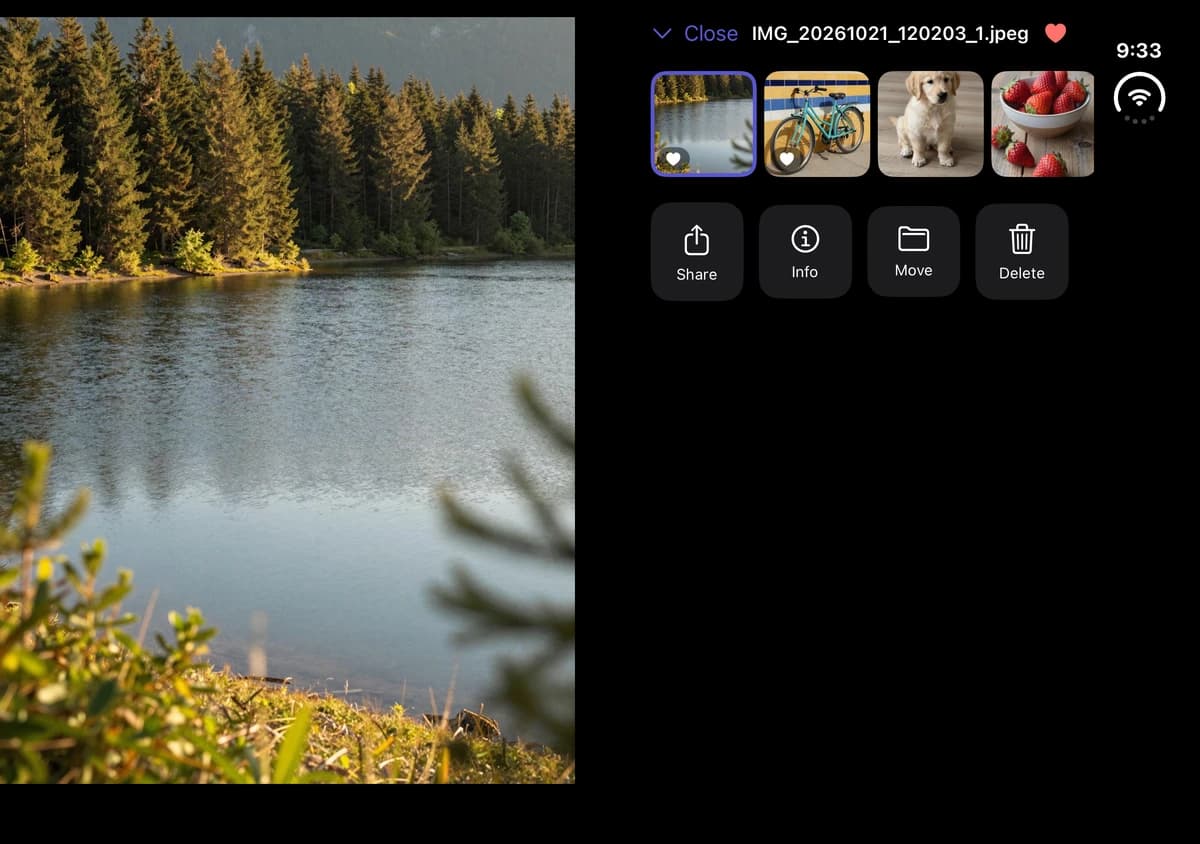
Privacy includes a way back
Vault Max encrypts files, thumbnails, notes and its index with AES-256-GCM. Each file has its own key, with vault keys protected using your credential and a secret in the device's Keychain. There is no Mad Max Labs server holding a recovery copy.
Supported videos stream from encrypted storage in chunks. Other playback formats and document previews may use temporary decrypted files that are removed when viewing ends or the vault locks. Export and share create the copies you explicitly request.
Encrypted backup writes a password-protected .vaultmax file covering the current vault and its descendants. Save that file outside the phone, keep its backup password separately available and verify restored content before retiring the old device.
If you forget a credential, an already-enabled biometric route may still give you time to make a backup. A usable archive and its password let you restore with a new vault credential. Without a working unlock method or usable backup, we cannot recover the encrypted contents.
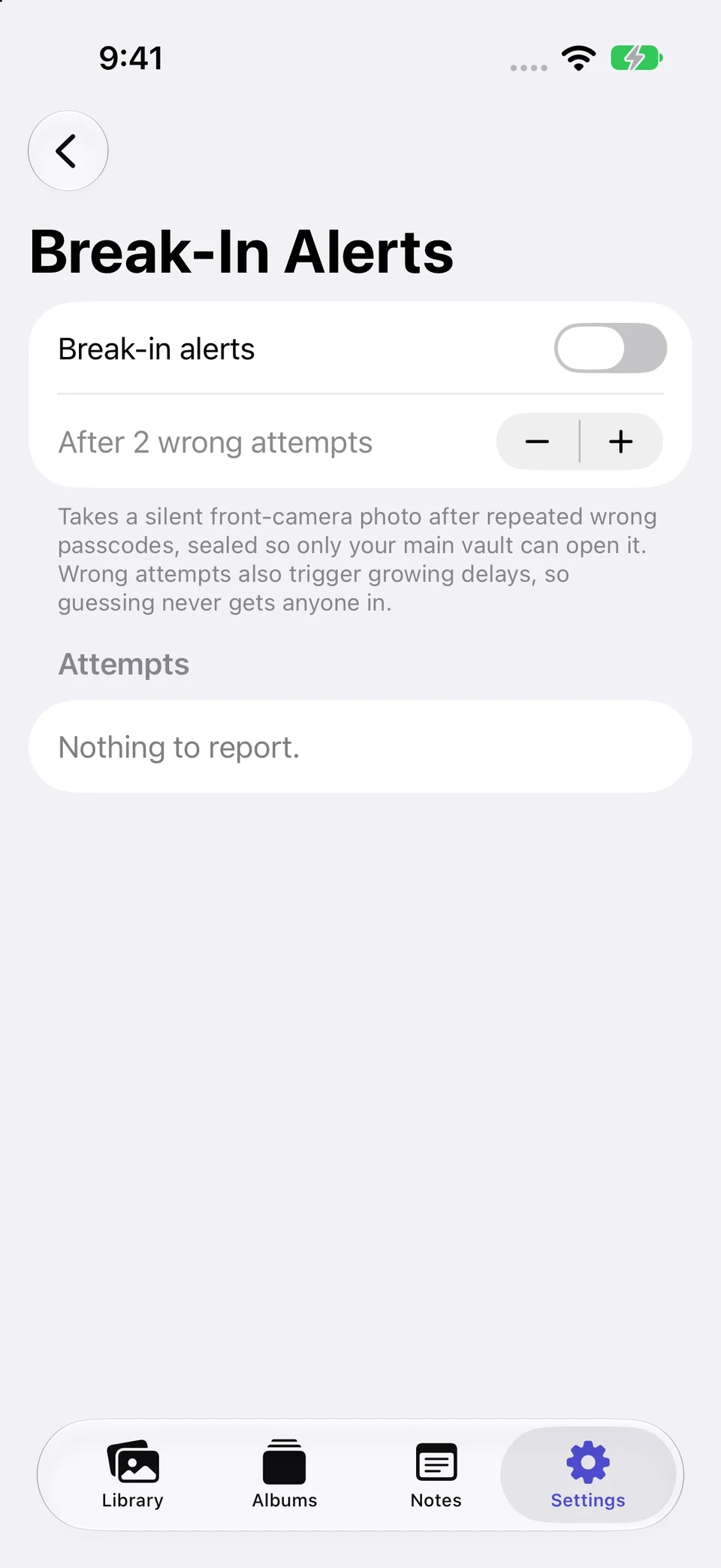
Break-In Alerts can record repeated wrong-code attempts and try to include a front-camera photo after your chosen threshold. You enable it in Settings, and capture depends on camera permission and availability. Records are encrypted to the main vault and reviewed there after unlock.
Vault Max makes no account or developer-server connection. Apple handles App Store payments and optional device backups. If you save an encrypted backup to iCloud Drive or another provider, you choose that destination and the provider handles the file under its own terms.
Security features are included at every tier. The paid options share the same capacity benefits: unlimited items and up to eight total vaults per device. Apple handles purchase, renewal, cancellation and restoration through your Apple Account.
| Plan | Price | Capacity |
|---|---|---|
| Free | $0 | 50 photos, videos and documents per vault; 1 extra vault |
| Weekly | $1.49 / week | Unlimited items; up to eight total vaults while active |
| Monthly | $3.99 / month | Unlimited items; up to eight total vaults while active |
| Annual | $14.99 / year | Unlimited items; up to eight total vaults while active |
| Lifetime Unlock | $19.99 once | Unlimited items; up to eight total vaults; no renewal |
Notes, viewing, export, delete and backup remain available on the free plan. Local prices and current purchase terms appear in the App Store.