
The quickest way to connect GoHighLevel to Claude is GoHighLevel's own MCP server (MCP is the standard Claude uses to plug into other software). In Claude, add a custom connector with the address https://services.leadconnectorhq.com/mcp/anthropic/v2, sign in to GoHighLevel, pick one sub-account and approve only the permissions the job needs. For work that has to run the same way every time, like publishing a social post, a script that calls GoHighLevel's API with a Private Integration Token is the better tool, and it is how we built our own one-command Instagram pipeline in July.
We build GoHighLevel integrations for clients. This is the setup we would hand one of them.
Does GoHighLevel have an official MCP server for Claude?
Yes. GoHighLevel's developer docs call it the LeadConnector MCP server (GoHighLevel's API itself runs on leadconnectorhq.com) and give each AI client its own address. Claude's ends in /mcp/anthropic/v2 and signs in with OAuth: you log in to GoHighLevel, approve a consent screen in your browser and never copy a token.
Behind it, GoHighLevel counts more than 550 operations across 38 areas of the CRM, from reads to deletes. Claude doesn't get 550 tools, only a handful. It searches the catalog for what you asked, reads an operation's inputs and required scopes, then runs it through one tool called execute_operation, which handles every create, update and delete and plenty of reads too (GoHighLevel's own example finds a contact with it).
There are two other ways in. The original endpoint, /mcp/, takes a Private Integration Token and your location ID as request headers and reaches a smaller set of tools (help center guide). Then there is GoHighLevel's REST API, which any script can call with the same kind of token, and which our WooCommerce bridges talk to.
One of GoHighLevel's help pages hasn't caught up. The guide above, last modified on 9 July 2026, still says OAuth support "is planned for a future release." The developer docs and two newer help articles describe the OAuth connector as live, and GoHighLevel's article on Claude connections recommends OAuth because it reaches a broader set of scopes and operations than a token does. If a tutorial says Claude has no native GoHighLevel support, it is out of date.
From Claude to GoHighLevel, by route
- 01The Claude connectorservices.leadconnectorhq.com/mcp/anthropic/v2
- Sign-in
- OAuth. A GoHighLevel login and consent screen in your browser.
- Reach
- More than 550 operations, filtered by the scopes you approve.
- Credential
- Held by the connection. Revoke it from your GoHighLevel account.
- Use it for
- Questions, lookups and one-off jobs in the Claude app or Claude Code.
GoHighLevel's help center says a Private Integration Token works here too, with fewer scopes. - 02The original MCP endpointservices.leadconnectorhq.com/mcp/
- Sign-in
- A Private Integration Token and your location ID, sent as headers.
- Reach
- A narrower set of tools and scopes, per GoHighLevel's help center.
- Credential
- A token you store, rotate and keep out of chats.
- Use it for
- AI tools that cannot do the browser sign-in.
- 03The REST APIservices.leadconnectorhq.com, one endpoint per job
- Sign-in
- A Private Integration Token in the Authorization header.
- Reach
- Whatever endpoints the token's scopes cover.
- Credential
- An environment file on the machine that runs the script.
- Use it for
- Jobs you repeat, like our posting pipeline.
How do I connect GoHighLevel to Claude?
In the Claude app
These steps follow Anthropic's custom connector guide for Pro and Max. They work the same in the desktop app and in Cowork, which Anthropic began merging into the main Claude app on 16 September.
- Open Customize, then Connectors. Click "+ Add", then "Add custom connector".
- Name it GoHighLevel, paste
https://services.leadconnectorhq.com/mcp/anthropic/v2as the server URL and click Continue. Keep the sign-in Claude detects (GoHighLevel uses OAuth), leave the OAuth client on Claude's published identity, which Anthropic recommends, and click Add. - Click Connect, sign in to GoHighLevel, choose the sub-account and review the scopes. Trim them here; the next section says how.
- Start a new chat and switch the connector on from the "+" menu, under Connectors.
- Ask something that only reads. GoHighLevel suggests asking for the last five contacts you added.
GoHighLevel's page sends you to Settings, then Connectors. In the Claude app today that menu is called Customize.
On the Free plan you get one custom connector. On Team and Enterprise, an Owner adds it under Organization settings and each person connects with their own GoHighLevel login, so Claude reaches only what that person can.
In Claude Code
One command, from GoHighLevel's docs:
claude mcp add --transport http leadconnector https://services.leadconnectorhq.com/mcp/anthropic/v2
Then run /mcp inside Claude Code (or claude mcp login leadconnector from your shell), and a browser opens for the GoHighLevel sign-in (Claude Code MCP docs). claude mcp list shows it as connected once you are through. If you already added the connector in the Claude app and Claude Code is logged in to the same account, it shows up under /mcp without the command. A team that shares one project config can also pin the scopes Claude Code asks for, with an oauth.scopes setting in .mcp.json.
With a token instead of a sign-in
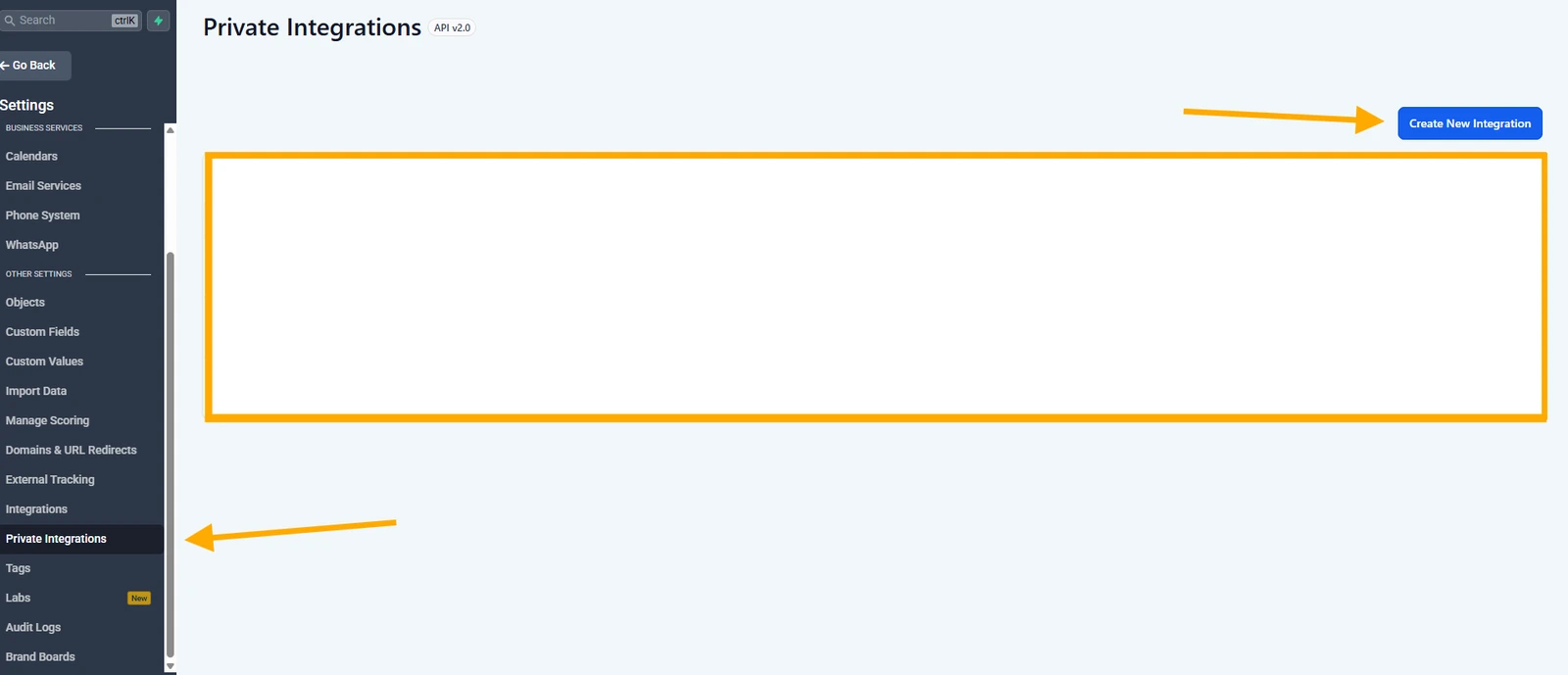
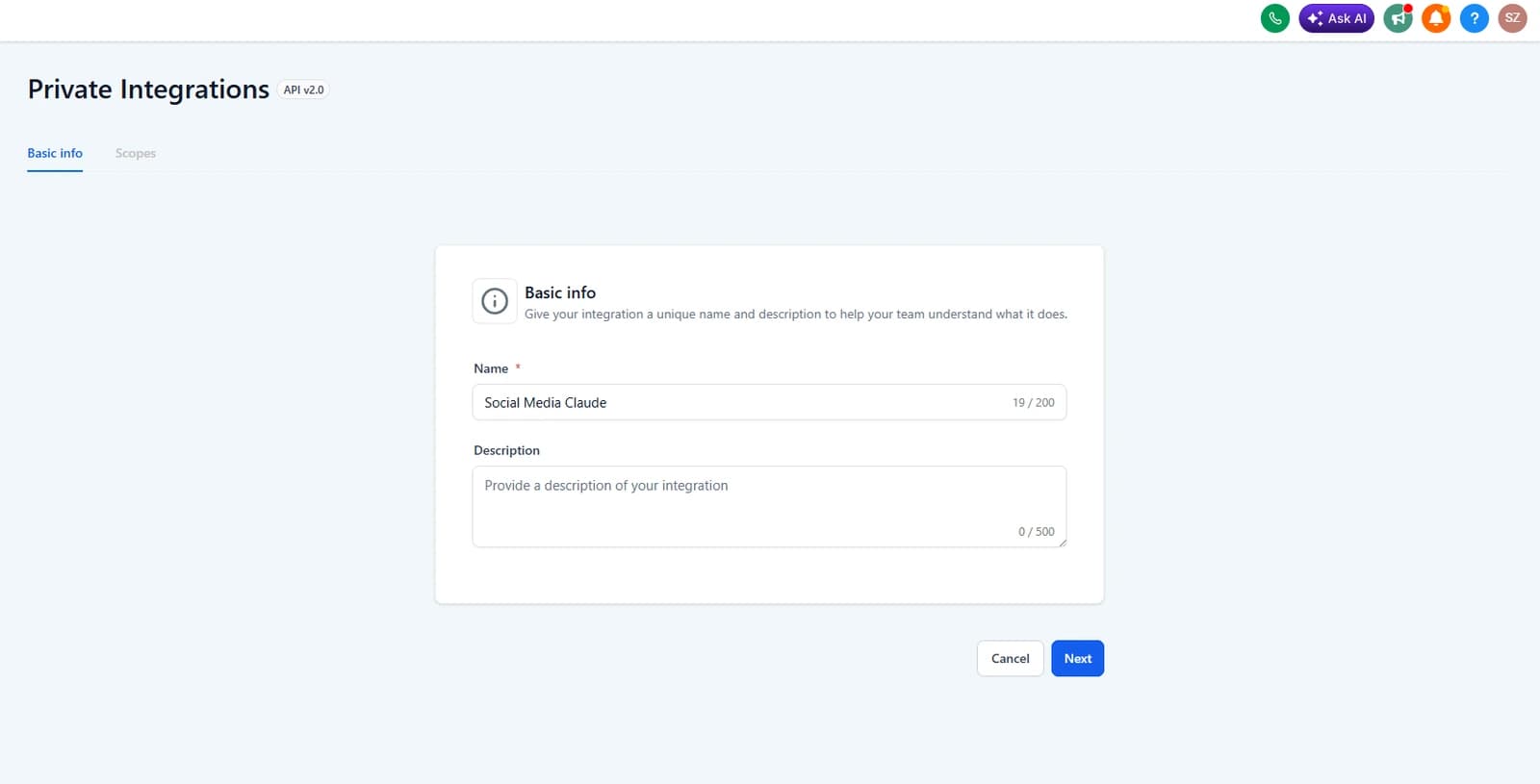
If the AI tool you use cannot open a browser sign-in, it can send a Private Integration Token instead: a long password for GoHighLevel's API. GoHighLevel's Claude article says the Claude address accepts one, with fewer scopes than the sign-in reaches, and the original /mcp/ endpoint takes one along with your sub-account's location ID. You create the token inside the sub-account under Settings, then Private Integrations: name it, tick the scopes and copy it straight away, because GoHighLevel won't show it again. For Claude itself we would use the sign-in.
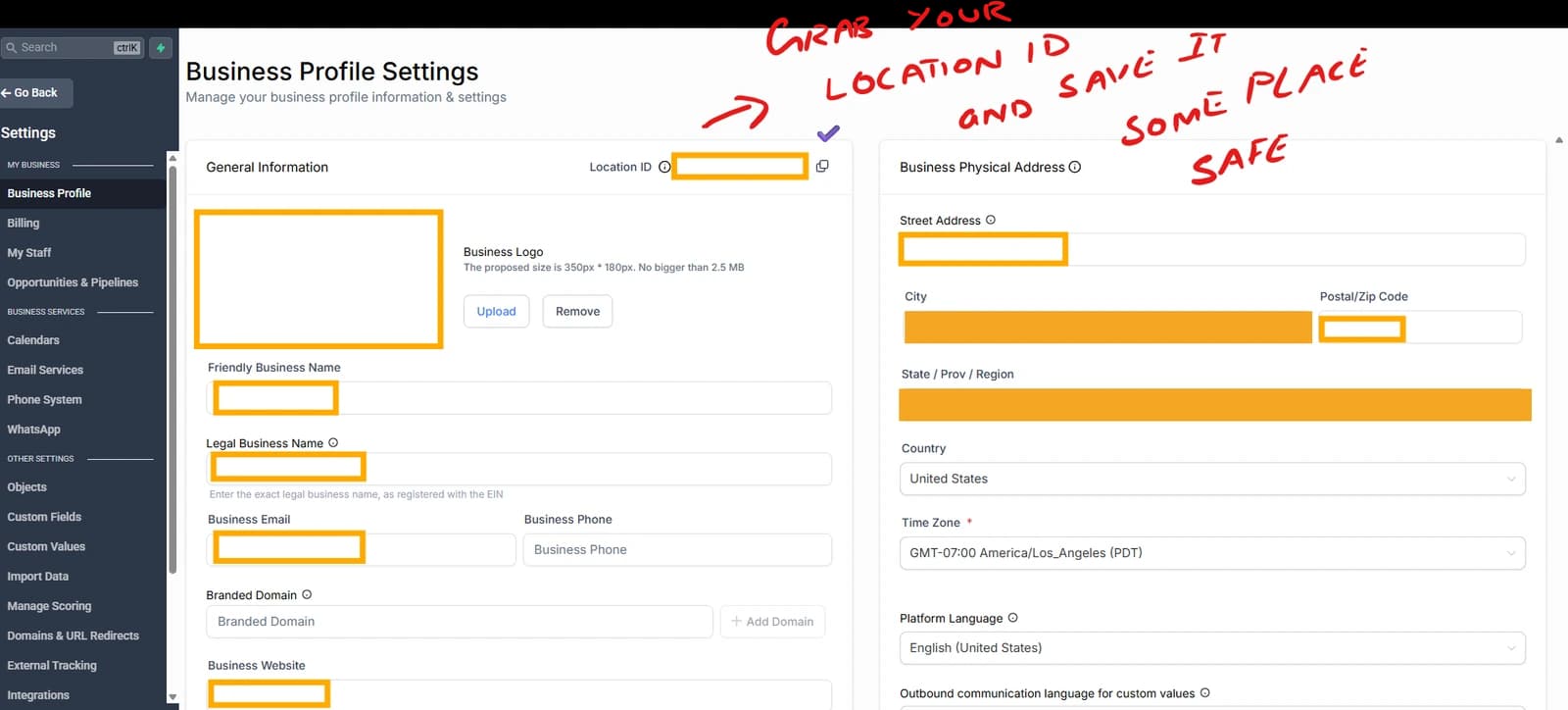
These captures are from our August setup, when we used the token route. They show where the integration starts; the OAuth sign-in above is a different flow.
The location ID identifies the sub-account. It is not the token and cannot replace one. For the original MCP endpoint, the two values travel in separate headers. Keep both in the local configuration that needs them.
Which scopes should Claude get?
Scopes are the permissions on the consent screen, each covering one kind of action, such as viewing contacts or sending messages. The Claude endpoint publishes the list it can ask for; we read it on 20 October 2026 and counted 172, from contacts to payments to phone numbers. You cut that down on the consent screen, where GoHighLevel's help center says you can select exactly which ones to grant. A Private Integration Token is limited by scopes too, from a shorter list, and GoHighLevel's original MCP guide lists them by friendlier names like View Contacts and Edit Contacts.
Read GoHighLevel's scope reference before you tick anything, because the names undersell what the scopes do:
contacts.write(Edit Contacts in the original MCP guide) also deletes contacts and adds a contact to a workflow. A workflow can send texts and emails.socialplanner/post.writecreates posts, and also edits and deletes them.conversations/message.writeis the scope that sends a message to a customer.users.writecreates, changes and deletes the people who can log in to the account.
Reads and deletes both run through execute_operation, so an "Allow always" given to a harmless "list my pipelines" also covers a later "delete this contact". Anthropic's guide says to click "Allow always" only for a tool you trust to run unsupervised. While any write scope is granted, approve execute_operation one call at a time.
Research mode needs the same care. Anthropic notes that during research Claude can call connector tools without asking each time, and tells you to switch off any tool that writes before you start. With GoHighLevel the reading tool and the writing tool are the same tool, so run Research only on a connection that holds read scopes alone.
GoHighLevel adds a check of its own: sensitive and irreversible operations ask for extra confirmation before they run. It is a useful backstop, and it only comes into play for scopes you already granted.
This is how we split the work:
What we let Claude do in GoHighLevel
- 01Claude does it alone
- Find a contact and summarize the history
- List opportunities that have sat in one stage
- Read today's appointments
- Draft a reply in the chat for a person to send
Read scopes- contacts.readonly
- conversations.readonly
- conversations/message.readonly
- opportunities.readonly
- calendars.readonly
- calendars/events.readonly
A read-only grant is the only one where "Allow always" is reasonable.
- 02Claude drafts in GoHighLevel, a person approves
- Stage a social post as a draft, or scheduled for review
- Add a tag or a note to a contact
- Move an opportunity to the next stage
Write scopes, approved call by call- socialplanner/post.write
- medias.write
- contacts.write
- opportunities.write
The post, contact and opportunity write scopes can also delete, and contacts.write can add a contact to a workflow that sends texts. Approve every call.
- 03A person does it
- Send a text or an email to a customer
- Delete records
- Change who can log in
- Take a payment or buy a phone number
- Change a workflow
Kept off Claude's grant- conversations/message.write
- users.write
- payments/orders.collectPayment
- phonenumbers.write
There is no workflow write scope at all. Through the API, workflows can be listed, not edited. The payment and phone-number scopes come from the Claude endpoint's scope list; GoHighLevel's scope reference does not list them, so read the consent screen before you grant either.
Can Claude post to GoHighLevel's Social Planner?
Yes. Social Planner is in the MCP catalog, covering accounts, posts, comments, categories, tags and statistics. We built our pipeline on the REST API in July 2026, and for a job that repeats every week we would still build it that way.
It had three parts. Claude Code handled the judgment: it got the image made, wrote the caption to a file and, for anything new, showed both to Falcon. It worked from a skill, a one-page instruction file Claude Code reads before a task, which set out when to use the pipeline, what each flag does (publish now, schedule, save as a draft, or a dry run that posts nothing) and that nothing new goes live without his yes. Then a single command ran a Node script that makes its API calls in a fixed order: five for a live post, four for a draft or a scheduled one.
How our pipeline published a post
- CClaude Code, with a skill
Gets the image made by an image model and writes the caption to a file. For anything new, it shows both and waits for a yes. Then it runs one command.
Claude's part ends here. Everything below is the script, run in a fixed order. - 1Find the social accountsGET /social-media-posting/{location}/accountsScope: socialplanner/account.readonly
Account IDs change when a social login is reconnected, so the script looks them up on every run.
- 2Find the authorGET /users/Scope: users.readonly
A post without a userId fails with a 422. The script picks the sub-account's own user.
- 3Upload the imagePOST /medias/upload-fileScope: medias.write
Converted to JPEG first, because Instagram rejects PNG and WebP. The post then points at the copy GoHighLevel hosts.
- 4Create the postPOST /social-media-posting/{location}/postsScope: socialplanner/post.write
Published, draft or scheduled. A scheduled post deletes cleanly; once a post was live, we could not edit or delete it through the API.
- 5Confirm it is livePOST /social-media-posting/{location}/posts/listScope: socialplanner/post.readonly
Live posts only. Publishing finishes after the create call returns, so the script polls this list for the permalink. It sends skip and limit as strings, because numbers get a 422.
Five more things those calls taught us:
- Some reads came back as a 401, the "unauthorized" error, saying "Command timed out". It was not a login problem: an immediate retry worked, so the script retries twice.
- Publishing finishes after the create call returns, so poll the list for the permalink. Our script waited 36 seconds; when the platform is busy, wait longer.
- A scheduled post deletes cleanly. Once a post was live we could neither edit nor delete it through the API, so the proofread happens before publish.
- The social logins inside Social Planner carry an expiry. Ours were due about two months after we connected them; GoHighLevel usually refreshes them, and the script warns if it sees one marked expired.
- One request carries one caption for every account in it, trimmed to the strictest platform's limit. GoHighLevel's create post reference gives Instagram 2,200 characters and LinkedIn 3,000. Send one request per platform when the captions differ.
On GoHighLevel's scope reference, the five scopes in the figure cover every call the script makes. Our own token held more: the full Social Planner set, plus contacts.write, because our site's lead form used the same token. Give each job its own token with its own short list. If you ever tick everything on the token screen anyway, untick users.write first, since it can add and delete the people who log in.
We ran this on our own GoHighLevel account until August, when we closed it to cut costs (our lead-alert post covers what that broke), and we still build on GoHighLevel's API for client work.
Is it safe to give Claude access to my CRM?
It is as safe as the grant you approve and the habits around it. Here are ours.
- Connect a single sub-account while you learn what Claude does with it. Every request already runs against one sub-account, and GoHighLevel's agency-wide connection is still rolling out.
- Grant the read scopes only. Watch which operations Claude reaches for before you add any write scope.
- Form fills, texts and emails in a CRM are written by strangers, and a stranger can write instructions. Claude has protections against that, and Anthropic still tells you to watch what goes in and out of a connector. So the connection that reads inbound messages should never hold the scope that sends them.
- Never in a chat, a screenshot or a shared prompt. An environment file is a private settings file the script reads, kept on the machine that runs it. We learned this one ourselves: our token got pasted into a chat once, which put it straight on the rotation list.
- GoHighLevel recommends rotating a Private Integration token every 90 days. A planned rotation keeps the old token working for seven days, and a leaked one can be expired at once. Editing a token's scopes keeps the same token, so your scripts don't need a new one. To end OAuth access, revoke it in your GoHighLevel account or remove the connector in Claude.
Tap a box as you go. Checks reset when you leave this page.
Two API quirks that cost us time
The Version header. Every request carries one, and endpoints have not always agreed on it. Our social calls ran on 2021-07-28, and so did the call that created a sub-account, while the SaaS endpoints we used to manage those sub-accounts (pausing one, for example) wanted 2021-04-15. GoHighLevel released a named v3 on 11 June 2026 and still lists the dated versions as supported (versioning). Read the version off each endpoint's reference page instead of setting one globally.
Snapshots. When we built sub-account provisioning, a snapshot could only be applied as the sub-account was created, with no call to push one into an existing account. If you script client onboarding, apply the snapshot in the same call that creates the sub-account.
When should Claude stop and a script take over?
The connector is right for questions and one-off jobs. Things worth asking it in the first week:
- "Which leads from this month haven't had a reply in seven days?"
- "List the opportunities that have sat in one stage for two weeks, with the last note on each."
- "Summarize my history with this contact before my 3 pm call."
- "Draft three follow-ups for these leads and show them to me here."
Anything you will do every week deserves a skill or a script, so it runs identically each time and a person approves whatever reaches a customer.
That is how our posting pipeline worked, and it is the shape of the automation builds we do for clients, including the GoHighLevel and WooCommerce bridge. For the people side, read how we set up Claude for a small sales team.
If you would rather have it set up on your own accounts, see Claude Code setup for one person or AI setup and training for a whole team.